Huawei DevEco Studio
Huawei DevEco Studio is the official IDE for Huawei's HarmonyOS operating system. It is based on IntelliJ IDEA Community (with some modifications) and includes additional features provided by Huawei.
DevEco Studio support
DevEco Studio 5 (at least version 5.1.1.850) and DevEco Studio 6 (at least version 6.0.1.251) are officially supported by Extra Tools Pack, Extra Icons, Extra ToolWindow Colorful Icons and Extra IDE Tweaks.
Plugin installation
Download the plugin file from the JetBrains marketplace website. The latest compatible versions are:
Click on Download.
Install the downloaded ZIP file manually in DevEco Studio: , and select the ZIP file.
Restart DevEco Studio.
License activation
You need to use an offline activation code because DevEco Studio does not support JetBrains authentication. To proceed:
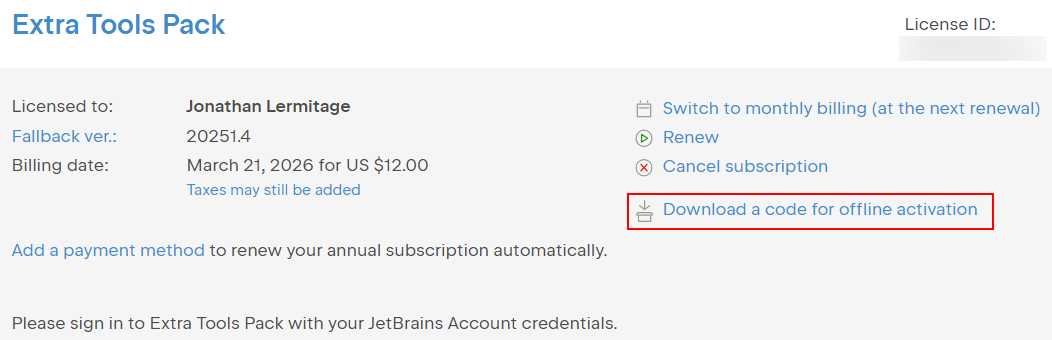
Visit your JetBrains profile: https://account.jetbrains.com/licenses, scroll to the plugin you want to activate, and click on Download a code for offline activation. Open the downloaded ZIP file. It contains a text file: open it and copy its content. This is your offline activation code.
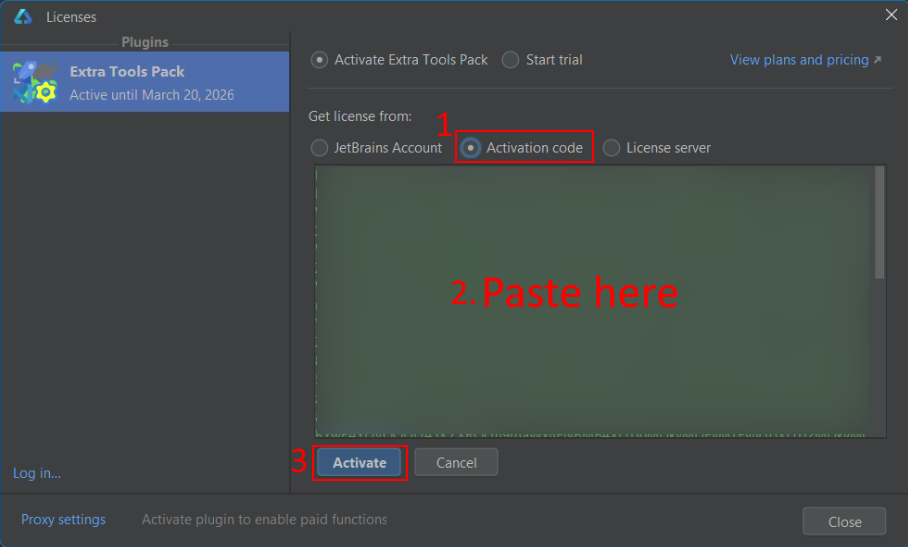
In DevEco Studio, go to , select the plugin you want to activate, click on Activation code, then paste your offline activation code, click on Activate.
Restart DevEco Studio.